唯的博客

  • 首页
  • 旧的
YUIのBLOG
我的小窝
  1. 首页
  2. 旧的
  3. 正文

宝塔Linux面板-安装golang环境

2021年10月6日 5点热度 0人点赞 0条评论

[title]1.打开golang官网下载页面[/title]

Go官网

选择相应的版本右键复制链接地址。

例如这样的:https://golang.google.cn/dl/go1.17.1.linux-amd64.tar.gz

然后用终端执行以下命令。

cd /www/server && wget -O golang.tar.gz https://golang.google.cn/dl/go1.17.1.linux-amd64.tar.gz
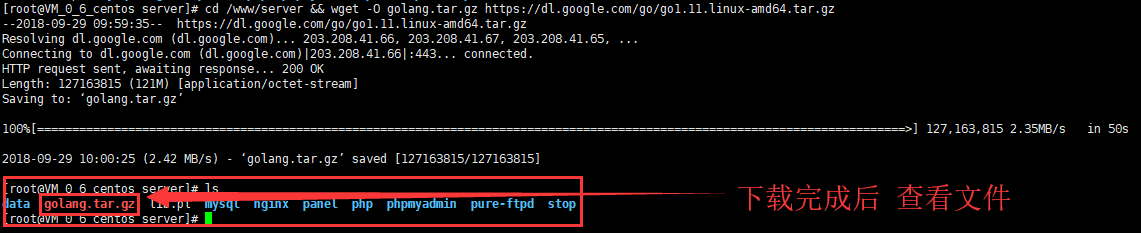
 

解压文件。

tar -xzvf golang.tar.gz

添加环境变量,使用vim 打开/etc/profile 文件


vim /etc/profile

在profile 最底部添加这些

export GOROOT=/www/server/go
export GOBIN=$GOROOT/bin
export GOPKG=$GOROOT/pkg/tool/linux_amd64
export GOARCH=amd64
export GOOS=linux
export GOPATH=/www/wwwroot/Golang
export PATH=$PATH:$GOBIN:$GOPKG:$GOPATH/bin
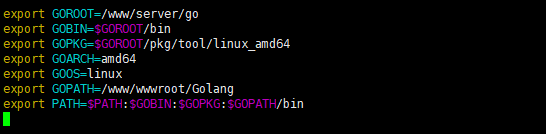
 

执行
source /etc/profile

安装成功!!
最后去创建GOROOT目录就可以了
mkdir /www/wwwroot/Golang
go安装成功!


标签: go 干货分享 教程 服务器
最后更新:2026年10月16日

YUI

这个人很懒,什么都没留下

点赞
< 上一篇
下一篇 >

文章评论

razz evil exclaim smile redface biggrin eek confused idea lol mad twisted rolleyes wink cool arrow neutral cry mrgreen drooling persevering
取消回复

归档

  • 2026 年 10 月
  • 2025 年 12 月
  • 2022 年 6 月
  • 2022 年 5 月
  • 2022 年 3 月
  • 2022 年 2 月
  • 2022 年 1 月
  • 2021 年 11 月
  • 2021 年 10 月

分类

  • 教程
  • 旧的
  • 未分类

COPYRIGHT © 2026 唯的博客. ALL RIGHTS RESERVED.

Theme Kratos Made By Seaton Jiang